# Introduction

MojitoSwap is a decentralized exchange running on KCC, with lots of features that let you earn and win tokens. It is fast, affordable and easily accessible as it is not difficult to use.
### **Features**
Mojito Finance boasts of amazing features that made it stand out. These features are elucidated upon below:
#### ↔️ **Trade**
The exchange is an automated market maker (AMM) that allows two tokens to be exchanged on the KCC. This is carried out to users' satisfaction effortlessly by Mojito Finance.
💸 **Earn**
On top of that, there are various ways to earn with MJT which are: \
1\. Earning $MJT with yield farms & Staking.\
2\. Earning $MJT with Swap.\
3\. Earning more tokens with Mojito pools.
🎲 **NFT**
The Mojito Finance NFT allows MJT holders to win more fun collections when played.
**Token**
Token Name: Mojito Token
Token: $MJT
Contract: 0x2cA48b4eeA5A731c2B54e7C3944DBDB87c0CFB6F
**Why KCC?**
In very simple terms, why would we want to drive a slow car that costs more to run? We are all about gamification, so we want to maximize the feedback loop of earning, staking, and earning again; all these and more can be achieved by KCC’s superior speed and lower transaction fees. Honestly, while KCC might not have Ethereum’s currently level of adoption, in the foreseeable future KCC is growing to bridge the gap in many ways.\
\
Trade Now:
# Our Advantage

### Community Driven👥
MojitoSwap is the first community initiated and driven decentralized exchange on KCC, and will gradually become community owned through DAO.
### Fabulous User Experience🧑💻
MojitoSwap is going to be a decentralized exchange with the most comprehensive token listing, best liquidity and ROI.
### More on Defi projects🎯
We are not just going to hold on to what we have right now, but to explore in various arenas and come up with innovative and cutting edge defi products. For instance, mining, lending and some exciting undisclosed features are coming up. Stay tuned!
# Our Roadmap

OK so it's not actually a roadmap: it's a to-do list, in no particular order, with no particular timeline. This is how we work: as fast as we can, on the things we can. Mojito is a way of life.
## **Launched**
* [x] Mojito homepage
* [x] Phase I airdrop
* [x] Trade
* [x] Phase II airdrop
* [x] Harvest all & Stake all
* [x] Personal dashboard
* [x] MJT Staking
* [x] Core Pools
* [x] Auto-compounding MJT-MJT Pool
* [x] Analytics (info)
* [x] Shaker(Trade Mining)
* [x] Referral
* [x] NFT Profile
* [x] Launchpad
* [x] Bar Counter
* [x] Rolling
* [x] Cocktail Lottery Tickets (Lottery)
* [x] Prediction Markets
## **Full Site Rework**
* [x] New homepage 2.0
* [x] Improved UX
* [x] Faster site
* [x] Mobile friendly
* [x] New navigation system
## Other products
* [ ] Voting (core feature)
* [ ] Lending & Borrowing: Lend and borrow KCC and LP tokens - MJT provides rate discount
* [ ] Margin Trading: Trade KCC tokens with leverage on-chain — periodic MJT buyback and burn
* [ ] NFT Ecosystem: Mint, trade, and more — all paid in MJT
* [ ] NFT-based Gamification: Complete tasks, level up etc. to earn NFTs — use MJT to mint
* [ ] Fixed-term Staking
* [ ] Customizable User Profile
# Brands & Logos
Guidelines and downloadable assets like the MojitoSwap logo SVG

### **Intro**
You can download the MojitoSwap logo at the bottom of this page. The following MojitoSwap ‘Brand Assets’ are copyrighted materials, and you may only use them in accordance with the policy detailed below:
* The logos, wordmark, and icon of MojitoSwap
* The name of MojitoSwap
* Other visual assets produced by MojitoSwap, including but not limited to illustrations and 3d models
Before you use the ‘Brand Assets’, please make sure you read these guidelines first.
### **What you may do**
You may use MojitoSwap’s Brand Assets when you are:
✅ Referring to our products and services
✅ Linking to our official site or products, such as "Get MJT on MojitoSwap"
✅ Announcing an official partnership, but only if you have the official approval of a qualified member of the MojitoSwap team
For information on other uses of our Brand Assets, please reach out at **
### **What you may not do**
It is very important to make our users' assets secure by protecting the MojitoSwap brand. Here are some forbidden items:
❌ Don't use our Brand Assets in your products' name, logo, NFTs, etc.
❌ Don't use our Brand Assets to create digital or physical products to make income
❌ Don't create derivative names that imply official endorsement
❌ Don't change or adapt our Brand Assets in any way
### MojitoSwap Logo Downloads

Once you've read all the above, download the MojitoSwap logo below.
{% file src="/files/8kWyOm37kXPfHc14qZf5" %}
# Security & Audit Report
Auditreport

Our contract was audited by **PeckShield.**You can check out by yourself:
MojitoSwap Audit Report:
### Transparent:
* We’re built on open-source software: our site and all our Smart Contracts are publicly visible for maximum transparency.
* Our contracts are verified on KCC explorer so you know that what you see is what you get.
### Security best practices:
* The developers use multisig for all contracts.
* Our contracts’ time-locks give you peace of mind.
# Business Partnerships

MojitoSwap's liquidity providers can get MJT rewards by staking liquid LP tokens in Bar (Farm).
Wine Pool is a product for staking tokens to obtain staking rewards.
Bar and Wine Pool are combined products. Generally speaking, in business cooperation, when the project provides token rewards for Wine Pool, Bar will also be created for liquidity mining rewards.
If your project requires such cooperation, please follow the procedure below.
### **Application for Bar and Wine Pool:**
1\) You need to fill in the application form.
[MojitoSwap Bar & Wine Pool Application Form](https://docs.google.com/forms/d/e/1FAIpQLSeNlEr9RRgPOSajjVk8aK64dBeiIWm7X4xw9FI6mZuFtdk-Yg/viewform?usp=sf_link)
After receiving the application, we will do our best to reply hopefully within one week. Due to the large number of applicants, we cannot guarantee that all applications will be answered timely. If you do not receive a response within 2 weeks, please send an email to ****;
2\) If you encounter problems during the application process, please contact [MojitoSwap Telegram](https://t.me/MojitoFinance) community administrator.
### Q\&A on How To Get Listed on MojitoSwap
**How to list tokens on MojitoSwap?**
Anyone can list any ERC-20 token on MojitoSwap and add liquidity directly to the liquidity pool without communicating or asking for our permission. After liquidity is successfully added, users can find and trade tokens through the token contract address.
**How to add my token to the default list?**
The list generates and displays tokens according to the following rules: it is based on the transaction volume within a certain period of time. The extended list contains most of the project tokens that have opened farms in MojitoSwap. Also, if the token is selected by the MojitoSwap team, it may be added to the extended list. We do not accept applications that want their tokens added the list. Users can enter token contract address to manually add and save tokens.
**How to add a token's logo?**
If you want to add your token logo, please refer to this document:
**What should I do if the token is forged?**
Because MojitoSwap is a decentralized exchange with an automatic market-making mechanism, it cannot prevent any ERC-20 token trading. Therefore, it is recommended that you ensure the visibility and clarity of the token contract address and correctly guide your users to conduct secure transactions.
**How to deal with errors encountered by users when trading tokens?**
Please contact **** providing the project name, token name, and errors encountered.
# Set up wallet on KCC

1\. Choose a wallet
To set up a wallet on KCC, the first thing is to choose the wallet that fits your needs best.
Users can use any Ethereum wallet and configure the network parameters of the KCC chain, such as MetaMask(Desktop and Mobile), Coin98(Only Mobile), TokenPocket(Only Mobile), etc.
> :warning:**When you're setting up a wallet, be sure to:**
>
> * ✅ **Download and install only the latest version from an official source.**
> * ✅ **Follow the setup guide carefully.**
> * ✅ **Safely back up your recovery phrases.**
> * ❌ **NEVER share your recovery phrases with anyone, under any circumstances.**
> * ❌ **NEVER input your recovery phrase to a website or app, other than your wallet app.**
#### [Download Metamask](https://metamask.io/download.html) (Automatically detects browser)
#### [Download TokenPocket](https://www.tokenpocket.pro/en/download/app) (iOS and Android)
#### [Download Coin98](https://coin98.com/) (iOS and Android)
#### 2. Create a Wallet
Taking MetaMask as an example
Open it and click "Create Wallet".


Next, follow along with the setup specified by the app. Go ahead and click Create a Wallet. Write down the backup seed phrase somewhere secret (preferably not on an Internet-connected device). Without this phrase, your funds can’t be recovered if your device is damaged or lost. Confirm that you’ve written them down on the next page. And that’s it! You should now see your wallet, ready to send and receive funds.
#### 3. Configure KCC Mainnet
After setting up your MetaMask, you need to click【Ethereum Mainnet】, and click【**Add Network/Custom RPC**】on the drop menu.
Enter the following configure value in the pop-up form:
**Network Name**: KCC-MAINNET
**Chain ID**: 321
**Currency Symbol**: KCS
**New RPC URL**:
**Block Explorer URL**:


#### 4. Get your wallet address
After setting up, you can get the KCC wallet address at the top of the page

Next: [Connect wallet to MojitoSwap](/get-started/connect-wallet-to-mojitoswap)
# Connect wallet to MojitoSwap

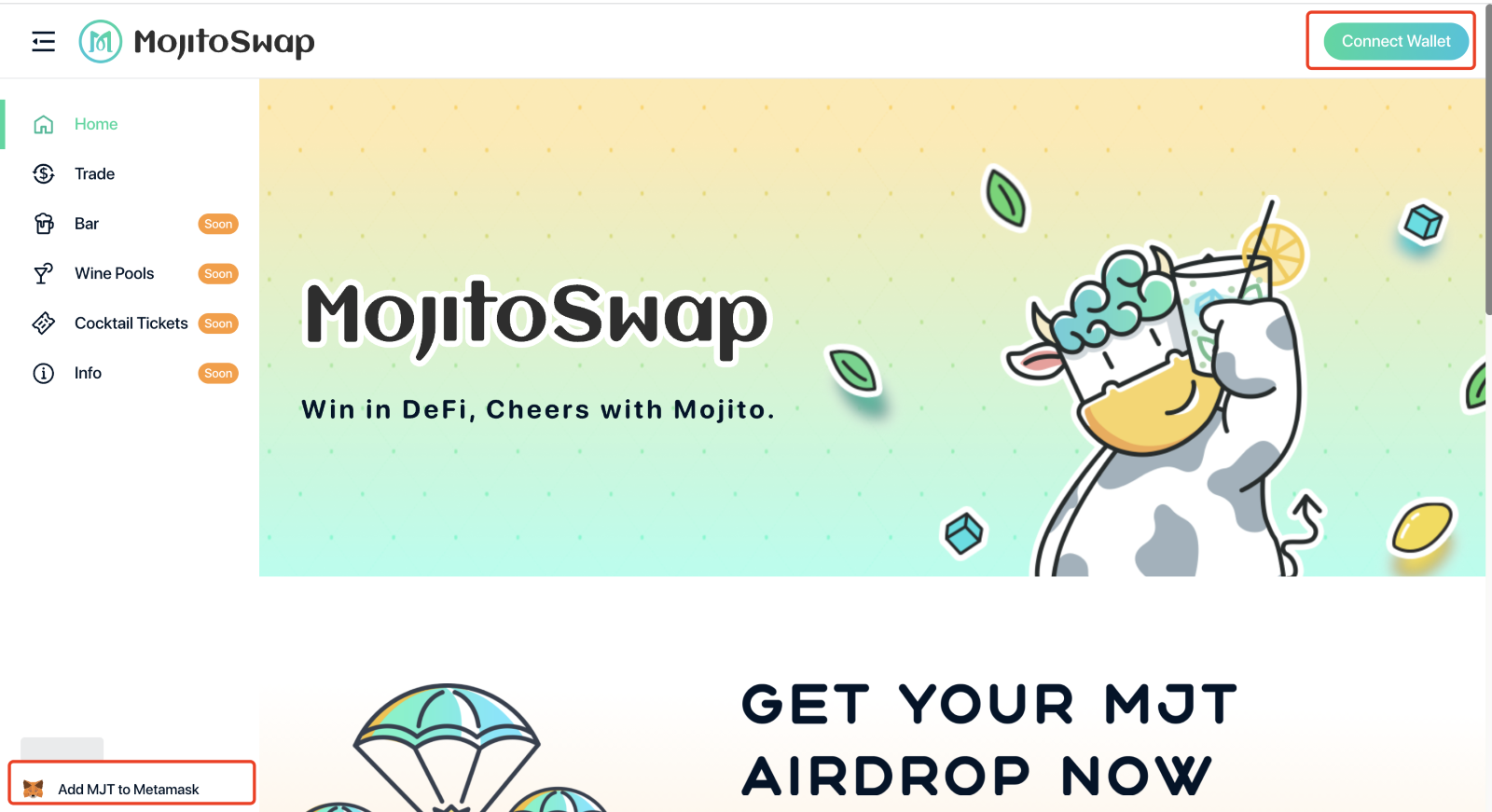
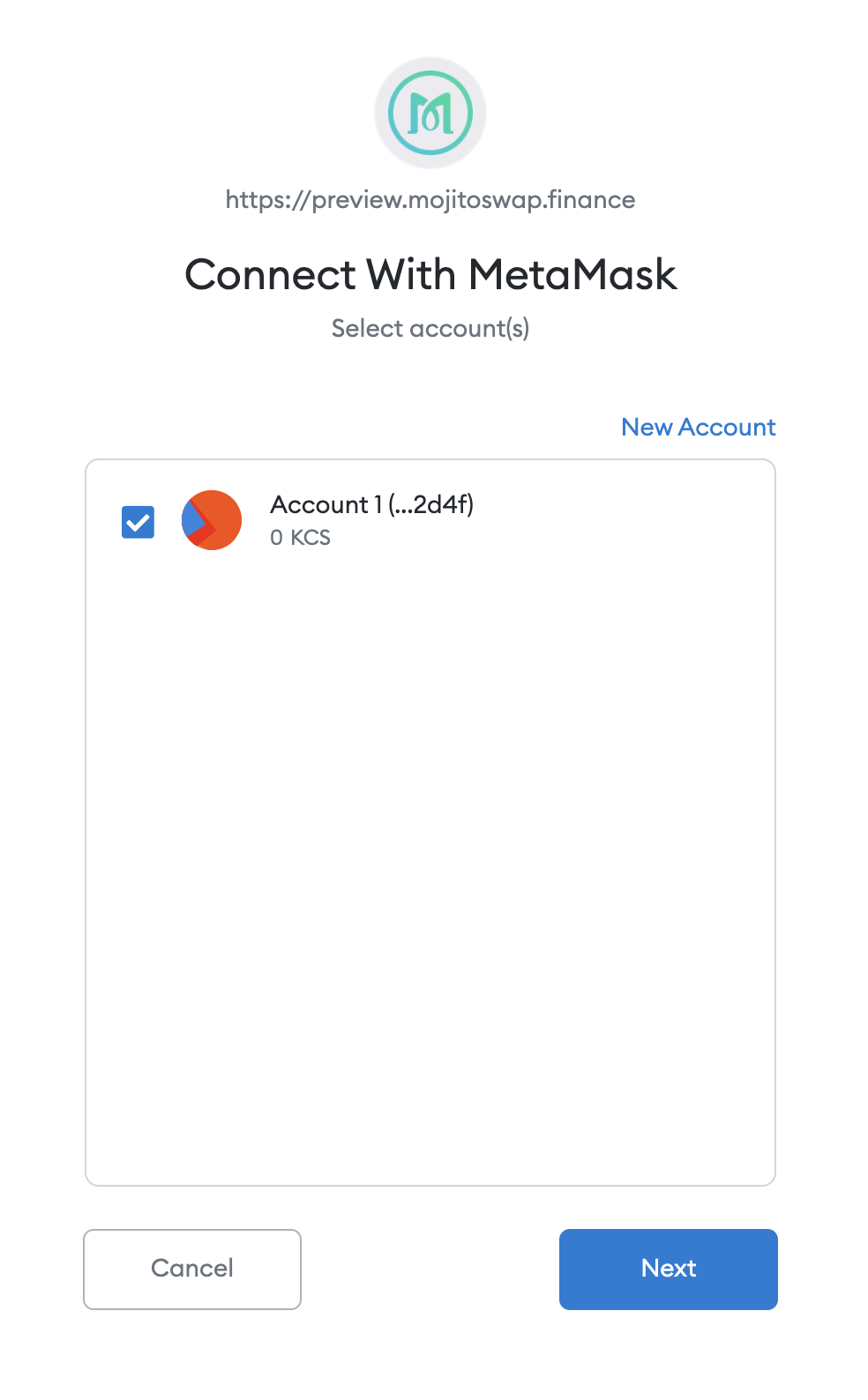
Enter the MojitoSwap [official website](https://app.mojitoswap.finance), and then click on the【Connect Wallet】on the upper right corner. And you can complete the connection after interacting with Metamask.

# Withdraw KCS from KuCoin to KCC

**Step1:**
Visit **kucoin.com** on PC or open KuCoin APP on mobile.

**Step2:**
Click "Assets" in the upper right corner, and go the asset page.
**Step3:**
After getting to the asset page, click the "Withdraw" button at the top right to jump to the withdrawal page.
**Step4:**
On the withdrawal page, you can select KCS through the shortcut option
**Step5:**
On the risk reminder of the withdrawal page, ,select "I have read and fully understand the risks", and click "Continue" to go to the withdrawal information page
**Step6:**
Enter your target adddress and choose the KCC network.

**Tips**
1\. The wallet address needs to be the one on the KCC chain
2\. Click here to know 【[How to set wallet on KCC Chain](https://docs.mojitoswap.finance/get-started/set-up-wallet-on-kcc)】
3\. The network needs to be KCC network
\
Start your journey:
# Withdraw your asset from KCC to KuCoin?

**Step1**:
Visit [www.kucoin.com](https://www.kucoin.com/) on PC or open KuCoin APP on mobile.

**Step2:**
Click \[Main Account] – \[Deposit] in the upper right corner to enter the asset deposit page.

**Step3:**
On the deposit page, Select MJT and KCC-Copy deposit address or Save QR code.


**Step4:**
Open the wallet - Select KCC MAINNET - Click \[Send] -Fill in the deposit address and related currency information in the Step3- Click \[Next].


### **Accessories: How to buy MJT**
**Step 1:**
Enter the MOJITO homepage and connect the wallet:

**Step 2:**
Click on Trade-Exchange on the left to enter the trading page.

**Step 3:**
Select the relevant assets and Click \[SWAP] to exchange MJT.

# Using MojitoSwap with Bridges
You don't need an account with KuCoin, Binance, Coinbase or any other centralized exchange to start using MojitoSwap!
MojitoSwap is a decentralized application. That means, unlike KuCoin or other centralized platforms, you don't need to register account to use it... you just need a crypto wallet. So how can you get crypto onto MojitoSwap without using a centralized exchange?
In this tutorial, we're going to guide you through the process of using "cross-chain bridges" to transfer your assets into your KCC Chain wallet, and start using MojitoSwap.
### **Move your assets from other blockchains to KCC Chain**
You can use a variety of different cross-chain bridges to transfer tokens from Ethereum, BNB Chain or other networks, onto KCC Chain.
[**KCC Bridge**](https://www.kcc.io/bridge/transfer) (Build by the KCC and KuCoin team) and its [**Guide**](https://www.youtube.com/watch?v=kZdX1V2Tgnc) Video.
[**MultiChain**](https://app.multichain.org/#/router) (Formerly known as Anyswap) and its [**Docs**](https://docs.multichain.org/).
# Exchange

MojitoSwap adopts AMM mechanism to provide users with KRC20 token exchange service. You can swap the mainstream assets such as ETH, KCS, MJT, USDC, and USDT.
The service provided by MojitoSwap is decentralized. The difference between DEX and centralized exchanges is that users can complete the exchange of crypto assets without registering or logging in.
Also, comparing with Ethereum and Bitcoin networks, MojitoSwap has lower gas fees and faster transaction speed.
{% embed url="" %}
How to use the Exchange on MojitoSwap?
{% endembed %}
### How to swap?
**Step1:**
Visit the website: [mojitoswap.finance](https://app.mojitoswap.finance/swap)
Connect Wallet

**Step2:**
Select a trading pair, such as ‘KCS’ and ‘MJT’

**Step3:**
Enter the amount you want to swap

Exchange:
# Cocktail Lottery Tickets
Cocktail Tickets is another big update for MojitoSwap. It is a game that's easy, fast, and convenient. The most important thing is that it gives you a chance to win a huge MJT prize!
### Basic consensus
* Price: $1 worth of MJT per cocktail ticket
* Restriction: There is no total limit, but a maximum of 30 tickets can be purchased at a time
* Rules: Match the numbers from the left side of your ticket to the winning numbers drawn at the end of a Lottery round.
### Winning Criteria
* The digits on your ticket must match the correct order to win.
Here’s an example lottery draw with two tickets, A and B.
Ticket A: The first 3 digits and the last 2 digits match, but the 4th digit is wrong, so this ticket only wins a “Match first 3” prize.
Ticket B: Even though the last 5 digits match, the first digit is wrong, so this ticket doesn’t win a prize.
Prize brackets don’t ‘stack’: if you match the first 3 digits in order, you’ll only win prizes from the ‘Match 3’ bracket and not from ‘Match 1’ and ‘Match 2’.
**The prizes are as follows:**
### Prize Funds
The prizes for each lottery round come from three sources:
* Ticket Sales: 80% of the MJT received from ticket sales goes to the prize pool for each round.
* Prize Rollover: After each round, if there are prize brackets with no winners, the MJT prizes of those brackets will be rolled over to the next round and will be redistributed in the prize pool.
* MJT Injections: 10% of the daily MJT production will be injected into the prize pool before the start of each round. This MJT is of course also included in rollovers!
# How To Play the Cocktail Tickets
How To Play
🎅If the digits on your tickets match the winning numbers in the correct order, you will win a portion of the prize pool. Just join in to earn more money to get more alcohol, bro.
\
Visit the MojitoSwap Cocktail Tickets page and look at the top of the page. The current round's prize pool is shown in (estimated) US dollar value. This is the amount to be shared by all the winners.
\
Next to the prize pool, you'll find the remaining time before the current round is drawn.
*Notes*
* *Not all Lottery rounds are equal. When a jackpot isn't won, the next round's prize pool will increase;*
* *The longer it's been since someone has won the jackpot, the larger the Lottery prize pool will be.*
* *The longer a round is open, the more people can buy tickets. Each ticket sold increases the prize pool further.*
## **Buy a Cocktail Tickets**
Buying tickets is easy. Prices are set when the round starts, **equal to $1 in $MJT per ticket**.
*Notes:*
* *A user can only buy 30 tickets at a time, but there is no limit to each purchase round!*
* *Buying multiple cocktail tickets at once gives a bulk discount on your purchase. You can buy as many as 30 tickets in one purchase, with the discount starting small at 2 tickets and scaling up to 1.45% at 30 tickets.*
1\. **Click \[MojitoGames ] >> \[Cocktail Tickets ]**
**2.Click \[Buy Tickets] to get your own tickets now! There's also another button at the lower part of the page;**
**3. A window will open to letting you choose how many tickets you want to buy. Type how many tickets you'd like to buy into the field.**
**4.You can choose to either randomize your lottery ticket numbers or manually choose your ticket numbers.**
① For Random Selection :
Numbers are randomized, with no duplicates among your tickets. You can click **\[Buy Instantly]** to get the tickets,When you're happy with the number of tickets, you want to buy, click Confirm and confirm your action in your wallet.
②For manual Selection,
To customize the numbers on your tickets, click the **\[View/Edit Numbers]** button.
Tap a number to edit it. Available digits: 0-9. You can randomize your numbers again by clicking the **\[Randomize]** button. When you're happy with your numbers, click the **\[Confirm and buy]** button.
*Notes:*
* The more tickets you buy, the greater the discount. The discount starts at 2 tickets and scales all the way to 30 tickets, where you will save almost 1.45% on your purchase.
* \[Automatic participation] button once opened, the same betting plan will be created automatically as this one
* You'll get a warning if you create duplicate tickets. It's possible your duplicate tickets will win. In this case, your tickets will share in the prize pool for their bracket.
## View your tickets after buying
You can view your tickets after buying them before the round's numbers are drawn.
**1. Click \[xx Tickets] in the "Last Draw" area of the page.**
**2.A window will open showing all of your tickets and their numbers. It'll also allow you to buy more tickets if you'd like.**
## Check for Prizes
On the top of the page, you'll see the current round's prize pool shown in (estimated) US dollar value.
There are two draws every day: once every 12 hours. Once the round’s over, come back to the page and check the results.
**1.Click \[Your History] in the "Completed Rounds" area of the page.**
**2. Click \[View More] to confirm the details.**
**3.If you won, click \[Withdraw] to claim your rewards.**
**4. You can change or cancel your Automatic plan on the ‘Automatic participation’ area of the page.**
## Referral Program
\
You can get extra MJT by inviting your friends to use Cocktail Tickets.
After your friend becomes your invitee, you will get **5%** of the transaction fees generated by them on buying **Cocktail Tickets.**
# Prediction
Prediction
**MojitoSwap Prediction** is a play-and-earn game where participants can predict whether the BTCK or ETH price will rise or fall – guess correctly to win $MJT!
Predict when you think the price of **BTCK/USDT** or **ETH/USDT** will be higher or lower than it was when the “LIVE” phase starts.
It is also very simple to judge **whether you have won the prediction**
| | | |
| ------------------------------ | --------------- | ---------- |
| **Performance** | **Your choice** | **Result** |
| Closed Price Is >Locked Price | UP | Win |
| Closed Price Is < Locked Price | Down | Win |
.
# How To Play Prediction?
How To Play Prediction
## Before Predicting
### 1. Connect your wallet
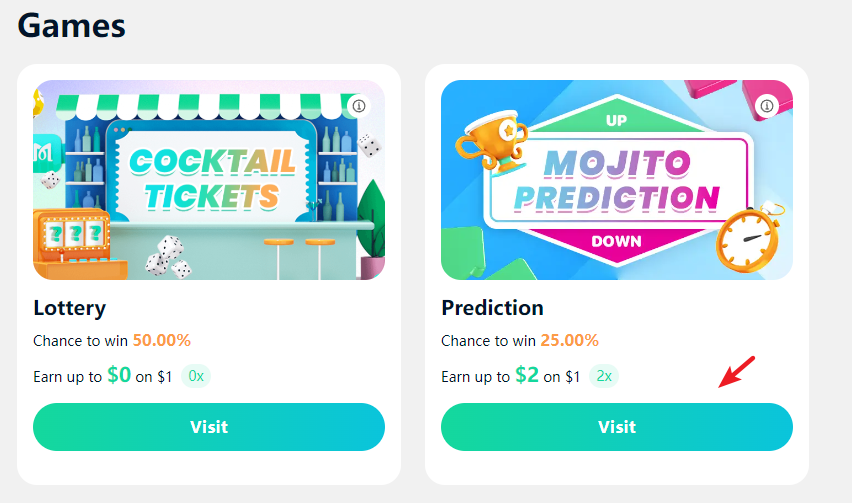
Click **\[MojitoGames ]** >> **\[Prediction ]** >> **\[Visit]**
### 2 View the info
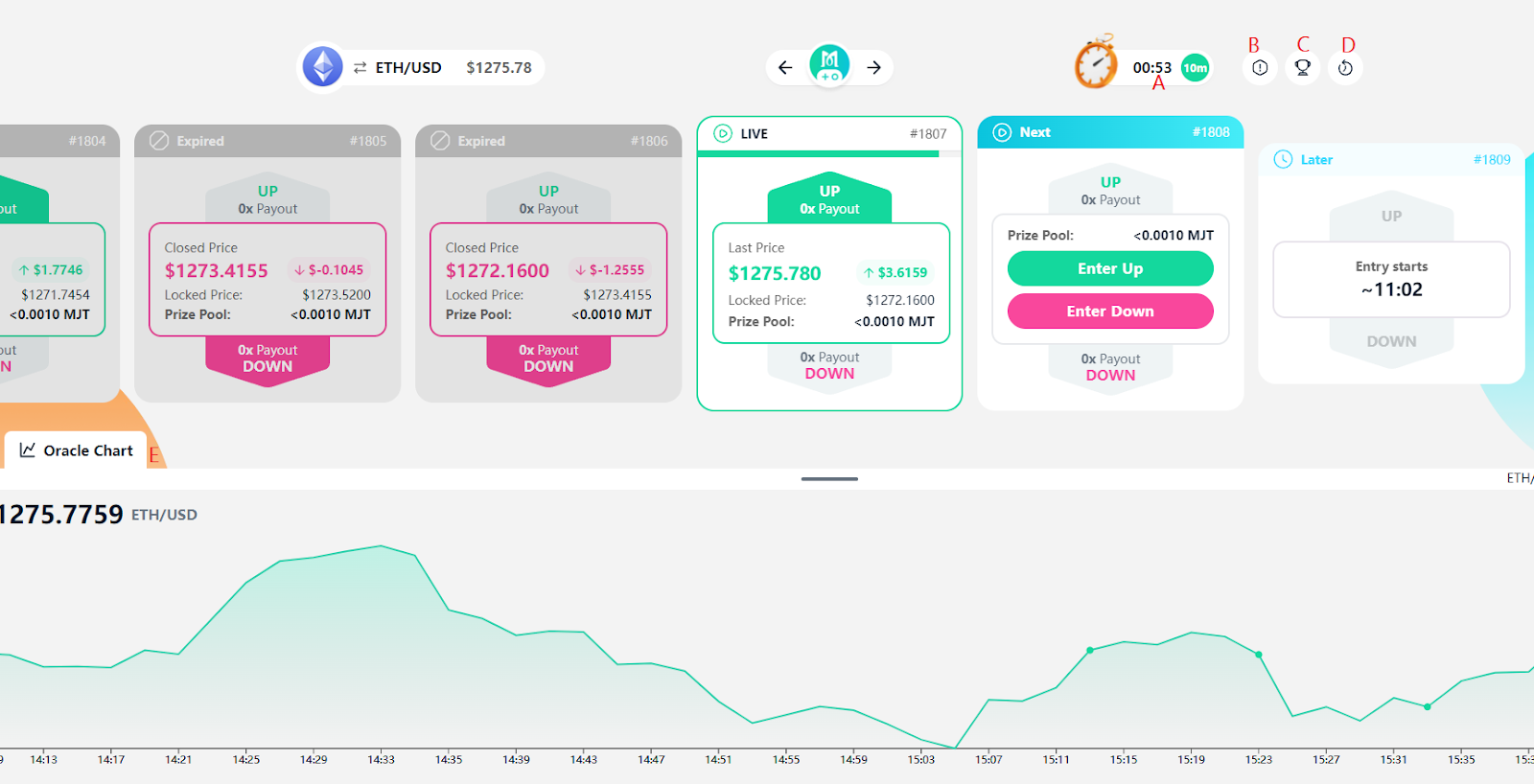
The Prediction page shows quite a bit of information. Predictions operate in 10-minute rounds. Make your prediction before a round goes live to join in.
**A.** Time Left: To enter a Prediction round, you'll have to check how much time is left in the current round. You'll find the timer in the top-right area.\
**B.** Tutorial: You can find more details here.\
**C.** Leaderboard: Let's see who tops the list.\
**D.** History: View the number of rounds and history of your participation.\
**E.** Oracle Chart: Can provide real-time price information.
## Start the Game
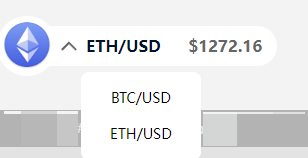
### 1. **Switch between two prediction markets**
MojitoSwap offers two separate prediction markets for every player to choose from. You can play based on the ETH/USDT price, betting with ETH. Alternatively, you can play based on BTCK/USDT price, betting with BTC.
### **2 .Make a prediction**
When you're sure you have enough time, you can place your prediction for the next round.
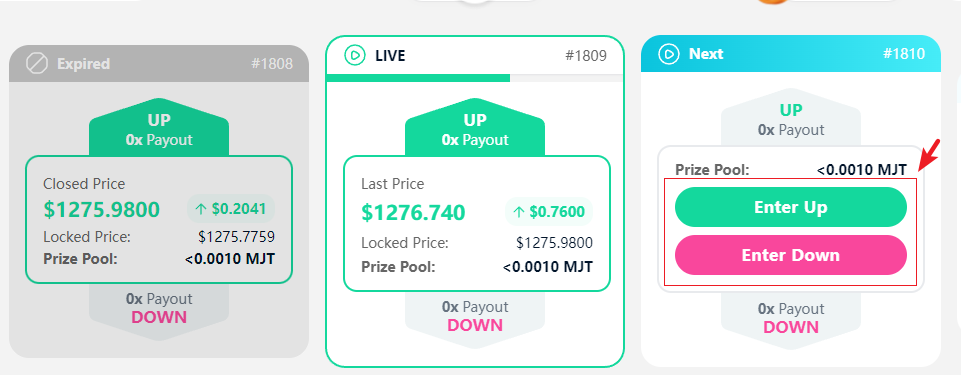
In the **"Next"** section, you'll see the green **"Enter UP"** button and the red **"Enter DOWN"** button. Click Enter UP if you want to predict a rise in price, and click Enter DOWN if you want to predict a drop in price.
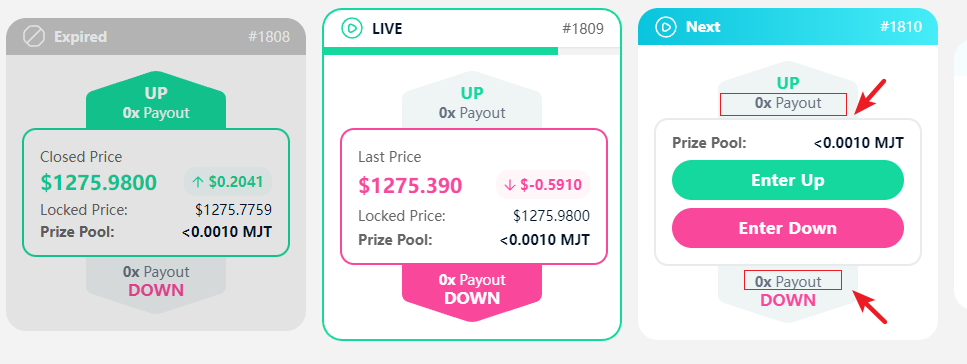
Each will have a different reward multiplier. The multiplier will change over time as the **"Prize Pool"** increases depending on the participant's predictions. The prize pool is shown just above the buttons.
We'll choose Enter UP for this example.
\
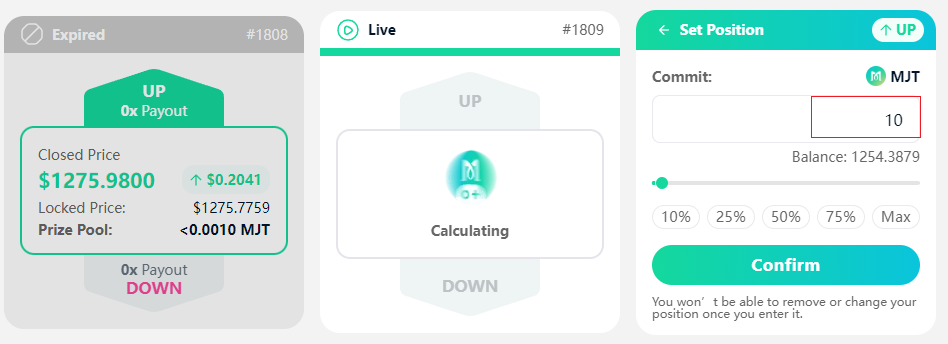
①Click **\[Enter UP]** >> type the number of tokens you would like to commit to your prediction for this round in the field >> click **\[Confirm]**
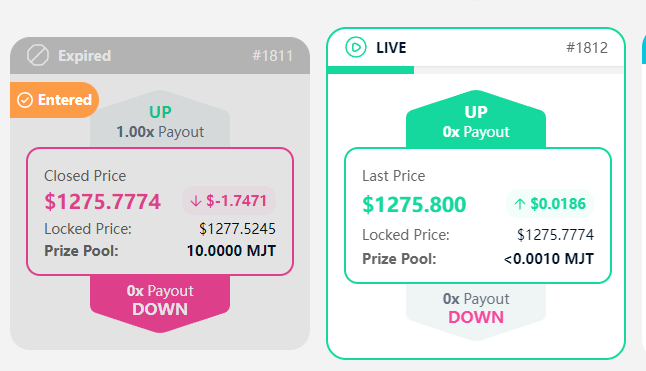
② After your transaction confirms, an **"ENTERED"** message will appear.
## View Results
### 1 .Waiting for settlement
As the 10 minutes finish, the "LIVE" section will change to "Calculating". Calculating the results only takes a moment.
### **2. Viewing your results**
The result of the round will display with either UP colored in green or DOWN colored in red.
### 3. Claim your winnings
\
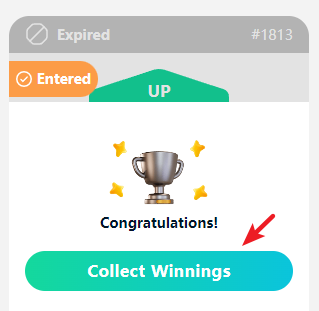
If you win your entered round, a \[Collect Winnings] button will appear, click that button, then click **\[Confirm]**.
*Notes:*
*A live round will last for 10 minutes. You can watch the price update during the 10 minutes if you'd like.*
*You cannot change your prediction during a live round. You are locked into your prediction from earlier.*
# Prediction FAQ
## General Questions
### 1. Is there a time limit before I can collect my winnings?
No, you’ll be able to collect your winnings at any time in the future.
### 2. How is the payout calculated?
* Payout Ratio for UP Pool = Total Value of Both Pools ÷ Value of UP Pool
* Payout Ratio for DOWN Pool = Total Value of Both Pools ÷ Value of DOWN Pool
For example, if there’s a 15 MJT prize pool in the DOWN side of a round, and the overall prize pool is 150 MJT, the DOWN payout ratio will be 150/15 = 10x.
* Payout Amount = Payout Ratio × Position × (1 - Fee)
In the above case, if the round ends on a DOWN result, if you committed 2 MJT to a DOWN position, you’d get a payout of (2\*10) × (1-0.05) = 19. Your profit would be 17 MJT (19 - 2).
\
The treasury fee is currently set at 5%; Treasury fees are used to buyback and burn MJT tokens.
### 3. What are the fees?
5% of each round's total pot will go to the treasury, which will be used to buyback and burn MJT every month.
### 4. How to collect winnings from older rounds?
\
You can collect winnings owed to you from older rounds at any time.
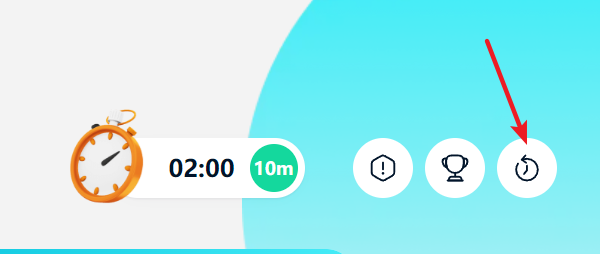
1\. Find more information on past rounds you've entered by clicking on the reversing clock icon
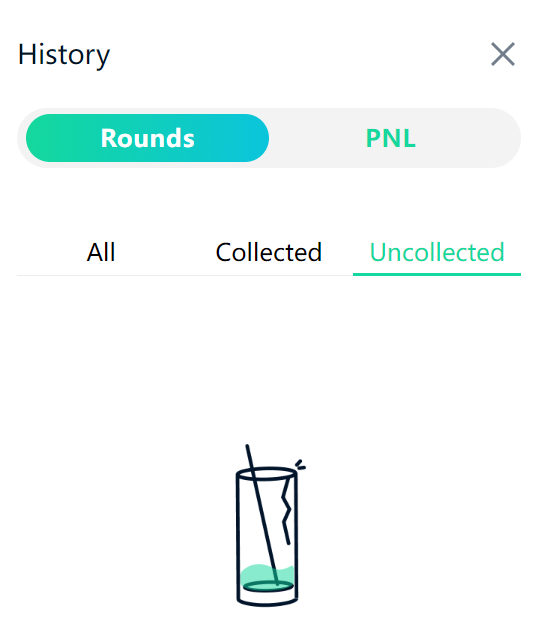
2\. A "History" panel will open. Click \[Uncollected] to view all rounds if you've not collected the winnings yet. Then click the \[Collect] button.
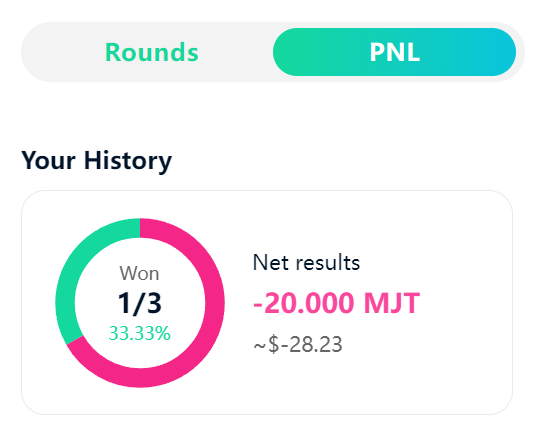
You can also view your historical profit and loss data by clicking \[PNL].
5\. What are you using for your price feed?
MojitoSwap uses ChainLink Oracle for our price feeds. ChainLink Oracle
* Used for the Lock price and End price of each prediction market round. This updates in intervals of 20 seconds.
* Our prediction contract uses the ChainLink Oracle price feed to set the prices used to dictate whether a user has won or not.
* Used for the "Chainlink" chart on the interface.
## About Positions
### 1. What happens if no one enters an opposing position?
If only one side of a round has positions entered into it, then that side loses, and the losing funds will be sent to the treasury.
For example, User A enters a UP position, and no one else enters a DOWN position. User A loses, and there are no opposing positions for the winnings to be paid out to. Funds are sent to the treasury.
### 2. What happens if the Locked Price and Closed Price are exactly the same?
In the very rare occurrence that the Locked Price is exactly the same as the Closed Price, no one wins, and all funds entered into positions will be sent to the treasury to be used for MJT buybacks to burn.
### 3. Can I change or remove my position?
No. Once you enter a position, you can NOT change the direction, add to, or remove your position. It's locked in, so make sure you're 100% happy with your position direction before confirming.
# Bar(Farm)
Bars allow users to earn MJT while supporting MojitoSwap by staking LP Tokens.

Bar is the liquidity mining function of MojitoSwap.
Users can add liquidity of a specific trading pair in MojitoSwap and stake the Liquidity Provider Tokens (that is, LP Tokens) in the Bar to obtain MJT mining rewards.
{% embed url="" %}
How to add and remove liquidity on MojitoSwap?
{% endembed %}
If you are an experienced player in the DeFi world, you can tell that our “Bar” is equivalent to other “Farm”.
We simply move the entire working environment from the cold outdoors to the warm Bar.
Bar:
# How to Use Bar?

Yield Farming on MojitoSwap is easy!
Yield Farming in Bar is a great way to earn MJT rewards on MojitoSwap.
Unlike Wine Pools, Bar requires you to stake two tokens to get LP Tokens, which you then stake in the Bar to earn rewards. This lets you earn MJT while still keeping a position in your other tokens!
Yield Farming can give better rewards than Wine Pools, but it comes with a risk of Impermanent Loss. It is not as scary as it sounds, but it is worth learning about the concept before you get started.
{% embed url="" %}
How to stake on MojitoSwap?
{% endembed %}
### **Getting prepared**
Yield Farming takes a little work to get set up.
You're going to need some ‘LP Tokens’ to enter into a Bar with. Bars can only accept their own exact LP Token; for example, the MJT-KCS Bar will only accept MJT-KCS LP Tokens.
To get the exact LP Token, you will need to provide liquidity for that trading pair. So to get MJT-KCS LP Tokens, you will first have to provide liquidity for the MJT-KCS pair.
It may sound intimidating, but it's not too complicated. Let's go through step by step.
### **Connect your wallet**
This is the first step which enable you to take part in yield farming. You will see a ‘Connect Wallet’ button when you hit the homepage of [MojitoSwap](https://app.mojitoswap.finance/farm). Click it and connect your wallet to MojitoSwap in KCC network.

### **Finding your Bar**
Before you proceed, you will want to choose a Bar that's right for you, and you will see a list of available [Bars](https://app.mojitoswap.finance/farm).

MJT-KCS and USDT-KCS are pinned to the top of the list with the default Hot sorting. After the pinned Bars, Hot will show other Bars in order of how new they are.
You can choose another sorting option if you like, such as by APR for the Bars with the highest reward rate currently.
When you find a Bar that you'd like to use, note down the trading pair, e.g. KCS-MJT in case you need it later.
### **Providing liquidity to get LP Tokens**
Now that you've found a Bar to stake in, you will need to add liquidity to get your LP Tokens.
Click on the row of the Bar you've chosen from the list. It will open to show more details.
On the left, you will see some links. Click the Get (your pair) LP link.
This will open the Add Liquidity page for your Bar's pair.

### **Putting your LP Tokens into a Bar**
Now that you have your LP Tokens, you are ready to start staking them in a Bar and earning rewards!
Go back to locate your Bar. When you're ready, click the Enable button and confirm your action in your wallet.
After a short wait, the Enable button will change to Stake LP. Click it and a new window will appear.
Type the amount of LP Tokens you would like to Bar with into the field, or just click Max to use all of your LP Tokens.
When you have the amount entered, the Confirm button will light up. Click it. Your wallet will ask you to confirm your action.
After a short wait, the window will close, and you will see your new staked LP Token balance in the details.
### **Adding or removing LP Tokens from a Bar**
You may decide you would like to add more LP Tokens to a Bar at a later date, or to take some out of a Bar. You can do this very easily whenever you would like.
At the top of the Bar page you will see a Staked only toggle. Click the toggle.
You should now only see the pairs you have LP Tokens in on the list, making it easier to find your Bar.

Find the Bar you have LP Tokens in, and click the row to view details. You will see a - and + button. Click - to remove LP Tokens, or + to add more LP Tokens.
Like last time, type the amount you would like to unstake/stake, or click Max to remove/add all available LP Tokens.
Make sure your information is correct. When you are ready, click the Confirm button and confirm the action in your wallet.
After a short wait, your new balance will show in the details section of your LP Token pair. If you've unstaked your LP Tokens, any unharvested rewards you had will automatically have been collected.
### **Collecting your Baring rewards**
Baring will bring you MJT rewards over time. You can collect these rewards and use them to get more LP Tokens, stake them in Wine Pools or anything else you'd like.
To collect your rewards, you will need to visit your chosen Bar and collect the MJT waiting for you.
Return to the Bars page. Find the Bar you staked your LP Tokens in, and click the row to view details. You should see an estimate of your rewards under ‘MJT earned’.
Click the Harvest button and confirm the action in your wallet. After a short wait, the MJT will be claimed to your wallet for you to use as you like.
### **How often should I harvest my rewards?**
How often you harvest your rewards is up to you, but it does help to remember that there is a small fee involved in harvesting.
You can see this fee in your wallet when confirming after clicking Harvest.
This shows the fee for harvesting as it appears in the MetaMask wallet. Different wallets will show the information a little differently. Consider leaving your rewards to grow for a while so you pay fees less often.
And that's all there is to it! You may also want to look at Wine Pool to earn rewards.
[Happy Baring!](https://app.mojitoswap.finance/farm)
# Bar V2(Dual Mining)
Bar v1 and Bar v2 will run simultaneously
### **What is BAR V2(Dual Mining)?**
In order to bring Mojos a better experience and richer rewards, we are excited to introduce the BAR V2. BAR V2 is divided into two mining modes, Dual Mining and Single Mining.
Compared with Single Mining, Dual Mining will provide two token rewards*.*
Taking KCS/MJT as an example, the Single Mining Bar only rewards MJT, but the Dual Mining Bar can not only harvest MJT, but also WKCS

*Notes:*
*1.Each Dual Mining Bar reward has a time limit, but you can continue to mine more MJT after the reward ends.* \
*2.In order for you to be able to withdraw the rewards of Dual Mining in time, please claim at least once before the Dual Mining goes offline to ensure that you can get the rewards.*\
*3.The migration will start on April 22th and end on May 17th, during which the reward weight of V2 pools will gradually increase from 1% to 100%. It is recommended that you migrate your assets as soon as possible, because the earlier you migrate, the more benefits you can enjoy.*
### **How to Use BAR V2( Dual Mining)?**
#### 1.Before using Dual Mining, you can first understand the basics of BAR
#### **2.Finding the Dual Mining Bar**
Before you proceed, you can choose a dual mining bar tagged with Bonus Earned, and you will see a list of available Bars.

#### **3.Providing liquidity to get LP Tokens**
Now that you've found a Bar to stake in, you will need to add liquidity to get your LP Tokens. Click on the row of the Bar you've chosen from the list. It will open to show more details. On the left, you will see some links. Click the Get (your pair) LP link.

#### **4.Putting your LP Tokens into Dual Mining Bar**
Click ‘Stake LP’- ‘Confirm’ to enjoy double rewards


#### 5.Get your rewards with just one click
Click the Harvest button and confirm the action in your wallet. After a short wait, the rewards will be claimed to your wallet for you to use as you like.
Notes:In order for you to be able to withdraw the rewards of dual mining in time, please claim at least once before the Dual Mining goes offline to ensure that you can get the rewards.

#### 6.Adding or removing LP Tokens from a Dual Mining Bar
Find the Bar you have LP Tokens in, and click the row to view details. You will see a - and + button. Click - to remove LP Tokens, or + to add more LP Tokens.
Like last time, type the amount you would like to unstake/stake, or click Max to remove/add all available LP Tokens.
Make sure your information is correct. When you are ready, click the Confirm button and confirm the action in your wallet.
### How to Migrate to Dual Mining
#### 1.Find the BAR you originally staked
At the top of the Bar V1 page you will see a Staked only toggle. Click the toggle.

#### 2.Remove your previous LP tokens
Click the row to view details. You will see a - and + button. Click - to remove LP Tokens

#### 3.Stake your LP tokens in Bar V2
If you don't know how to add it, please refer to the tutorial above
# Wine Pools

[Wine Pools](https://app.mojitoswap.finance/pools) will be the easiest way for you to mine tokens on MojitoSwap.
At the first stage, we will open the MJT Pool, where you can deposit your MJT in the Pool to get more MJT.
We will open the simple staking and compounding staking pool at the same time.
The latter will automatically reinvest your MJT rewards in the Pool to obtain higher returns, while the former requires you manually withdraw your MJT in the Pool.
# How to Stake in Wine Pools

[Wine Pools](https://app.mojitoswap.finance/pools): the simplest way to earn on MojitoSwap
It's simpler than farming with MojitoSwap's Bars, because unlike the Bars, you only need to stake one token to start earning: usually MJT.
### **Getting started with Wine Pool staking**
1\. Go to the Pools page.
2\. Connect to your KCC-compatible wallet by clicking the Connect button (top right-hand side).
3\. Click Unlock Wallet.
4\. Choose which Wine Pool you want to stake in.

Auto MJT automatically compounds your rewards: any MJT you earn will be harvested and re-invested in the same pool for you.
Manual MJT does not automatically compound like Auto MJT. You’ll need to harvest and compound your earnings manually.
You should now be able to see details on your wine Pool. Auto MJT will show a countdown until the unstaking fee ends. The other pools will show a Collect button to claim your staking rewards into your wallet.
Other Wine Pools let you stake your MJT to earn dozens of other cool tokens. Make sure you check them out.
5\. Once you choose a pool, click the Enable button. Your wallet will ask you to confirm the action.
6\. The Enable button should now be replaced with Stake. Click the button to bring up the staking menu.

7\. Type in an amount or slide the rabbit to choose how much MJT you want to stake.
8\. Click Confirm. Your wallet will ask you to confirm the action.
9\. The Confirm button will change to "Confirming", then once the transaction is successful, you’ll see your staked amount change and the button will change again.
10\. You should now be able to see details on your Wine Pool. The pools will show a Collect button to claim your staking rewards into your wallet.
### **Adding and removing MJT from a pool**
You can easily add more MJT to a Wine Pool, or move some MJT to a more profitable pool. Here is how you can move your staked MJT.
1\. Click the - to take some MJT out of a pool, or the + to add more to the pool.

Please note that unstaking from the Auto MJT pool has a fee of 0.1% if you unstake within 72 hours.
2\. A window will open. If you clicked the +, choose the amount you would like to add to the pool. If you clicked the -, choose the amount to take out of the pool.
3\. Click Confirm.
4\. After a little wait, you'll be able to see your new amount of staked tokens.
Pool:
# Shaker
1.Connect to decentralized wallet "MetaMask" installed in extension on browsers (it will automatically change to KCC net), you can get rewards in terms of $MJT by just swapping assets.

2.When you hit the 'Exchange' tab, you can swap the particular trading pair at "swap" page, after this you can check and withdraw the trading rewards at the same page by clicking the button "Claim"

3\. Then $MJT will land in your wallet. The $MJT rewards would accelerate until you claim them.
4\. The specific shaker rewards distribution is as follows:
pairs
a) Multiplier determines the weight of reward that each trading pair gets distributed from every block. For example, if 1x means that the user gets 1 MJT reward in a block by trading mining, 10x means 10 MJT rewards for each block.
**Tips:Please claim your $MJT rewards in time, or MJT which you can claim might get decrease/diluent by other trading users.**
Shaker:
# Referral
What is the MojitoSwap Referral, and how to use it?

### What is MojitoSwap Referral?
MojitoSwap Referral Program aims to reward those users who are willing to promote MojitoSwap. Users can share their unique referral links with others. Anyone who connects their wallet on the KCC network will become your invitee. As a reward, both the inviter and invitee will receive commissions based on the transaction completed by the invitee.
In short, **users can get extra MJT by inviting their friends to MojitoSwap**.
### About Commission Rules
After your friend becomes your invitee, you will get ***5%*** of the transaction fee generated by them on MojitoSwap. Your friends will also get ***1%*** of the transaction fee generated by themselves.
**Notes:**
1. *The commission will be counted when users complete transactions on MojitoSwap by swapping the following trading pairs: USDT-WKCS, USDT-USDC, MJT-WKCS, WKCS-USDC, WKCS-ETH, MJT-USDC, USDT-MJT, and WKCS-BTCK.*
2. *The commission income is calculated from 00:00 on T Day to 00:00 on T+1 Day (UTC), the income will be issued at 06:00 AM on T+1 day (UTC).*
3. *The commission will be calculated in USDT value and distributed as MJT based on the average price of MJT-USDT on that day.*
4. *The commission will be available to be claimed for up to 7 days. The system will automatically take back any unclaimed commission after 7 days.*
5. *Invite new users rebate is valid for 90 days,no rewards will be returned after 90 days.*
### How to use the Referral?
1. Go to [https://app.mojitoswap.finance/ ]()and connect your wallet to the KCC network. Here is the [tutorial](https://docs.mojitoswap.finance/get-started/connect-wallet-to-mojitoswap) on how to connect your wallet to MojitoSwap.

2\. Click the **‘Referral’** button on the side banner.

3\. You can **view the Referral link and Referral ID** on the page. You can copy the referral link to share it with your friends or on social media. Or click ‘Invite now’ to send an invitation via poster.

***Note:*** Please make sure your invitee clicks this button below when they use your referral link to connect their wallet on MojitoSwap.

Don’t worry if the confirmation page is closed. Users only need to click ‘**Add referrals’** on the Referral page and enter the inviter’s referral ID to bind.

4\. Scroll down to the bottom of the page to **view the commission details on DashBoard and Referrals.**

**Earn extra MJT by inviting your friends to MojitoSwap.**
[Let's start!](https://app.mojitoswap.finance/referral)
# Profile

Profile is the first stop of the Mojito Metaverse. **Users can choose different careers as their initial characters by minting Starter NFTs.**
With the launch of the Mojito NFT Marketplace and the update of subsequent versions, users can not only buy and sell the Starter NFT freely, but also buy new skins for the NFT. Skins can enhance the potential value of Starter NFTs by transforming their character image. At the same time, the value of Starter NFT will be gradually increased as the ecosystem of MojitoSwap grows. **Most importantly, it will be required to get access to the upcoming Mojito Launchpad.** It is also an important component of the Metaverse or GameFi of MojitoSwap!
# How to set up your profile?

**First, connect a wallet that supports the KCC network to MojitoSwap.**
**Second, click 'NFT'> 'Profile'. And enter the setup page by clicking 'Activate your profile'.**

**Third, choose a career you like and click 'Enable' > 'Confirm'.**

There are 5 careers in the 1st version. Minting different careers will cost different amounts of MJT, which will have different skillsets and additional properties in the future so you can make decisions based on your own preferences. Note: You are only allowed to mint once for the starter collection!
**After the step above, you can then set your name and click 'Enable'>'Confirm'> 'Next Step'.**

Note: Once the name is confirmed, it cannot be modified. So please tread carefully and set it properly.
**Next, you can select and join your favorite team, click 'Completed Profile' to complete the setup.**

Note that changing teams are not allowed once you joined, however, so please choose wisely. The rules regarding the teams will be revealed in the future. For now, you can choose your team and fight for hidden honor and wealth.
**Lastly, once your Mojito profile is all set, you can now view your NFT.**
Users can click the modification symbol to replace their avatar with other NFTs in the collection. You should take note however that only non-Profile NFTs can be traded.
***Important Notes:***
*1. MJT is required to mint the Starter NFT. It is recommended that users purchase or deposit enough MJT to the wallet in advance.*
*2. Usernames are one of a kind. Get your favorite names registered as soon as possible.*
Click the [link](https://app.mojitoswap.finance/nfts/profile) to start the journey of minting MojitoSwap Profile’s NFT now!
# Launchpad

MojitoSwap is currently the largest DEX running on KCC with an AMM mechanism. MojitoSwap Launchpad aims to attract high-quality projects to deploy on KCC and further expand the on-chain ecosystem.
From the users’ perspective, MojitoSwap Launchpad is an easy-to-access channel for participating in the primary investment. For the project, MojitoSwap Launchpad is a premium fundraising platform. Projects can not only grab market attention but also raise funds effectively. At the same time, it is a great opportunity to promote the project to KCC users.
# How to participate in MojitoSwap Launchpad?

**Before Sale**
1\. Set up your wallet on KCC and connect your wallet to MojitoSwap.
[The tutorial of how to set wallet on KCC](https://docs.mojitoswap.finance/get-started/set-up-wallet-on-kcc)
[The tutorial of how to connect your wallet to MojitoSwap](https://docs.mojitoswap.finance/get-started/connect-wallet-to-mojitoswap)

2\. Set up your own Profile and join a favorite team. [View the tutorial right now](https://docs.mojitoswap.finance/products/how-to-set-up-your-profile)
*Note: This step cannot be skipped. Setting up your Profile and joining a team is required to get involved with the Launchpad.*

3\. Prepare enough MJT in advance. [Click here to see how to buy MJT ](https://docs.mojitoswap.finance/products/exchange)
*Note: There may be differences in the MJT tokens required by different projects. Please refer to the project announcement.*
**During Sale**
Currently, MojitoSwap Launchpad is divided into two Methods: Limited Sale and Unlimited Sale. Users can choose of their own will.

***Notes:***
*1. The participation time of Limited Sale and Unlimited Sale is different. Please pay attention to the opening and closing times.*
*2. The sales methods of both Limited Sale and Unlimited Sale are '**oversold overflow**'.*
*In the 'oversold overflow' method, users can invest any amount of MJT tokens in participating in Launchpad at their discretion. The number of tokens a user ends up earning depends on their share of the total amount invested in Launchpad. After the sale, users can claim the purchased tokens, and get back the remaining funds (MJT Token) that have not been withheld.*
*In short, the more funds users invest, the more tokens they eventually buy. After the sale, users can receive MJT tokens that have not been withheld.*
*3. There is a handling fee for the Unlimited Sale, and the handling fee will be dynamically balanced according to the oversold ratio.*

**After-Sale**
1\. After the sale, users need to claim tokens within the specified time. Failing to claim it within the time limit will be regarded as a waiver of the eligibility to receive it.
2\. Users need to claim the MJT tokens that have not been withheld in time, and MojitoSwap will have the right to dispose of the MJT tokens that have not been claimed after the expiration date.
# NFT Marketplace

MojitoSwap NFT Marketplace is a platform where users can freely trade NFTs. Users can trade in-game props, collectibles, artwork, music, GIFs, and almost all types of NFTs here. And it will become the major place for trading KCC NFTs and KuCoin NFTs in the future.
The launch of the Mojito NFT Marketplace fills the vacancy of MojitoSwap in the NFT areas. It also means that Metaverse will be a crucial component of MojitoSwap.
Currently, MojitoSwap NFT Marketplace is committed to becoming the largest NFT trading platform on the KCC. Therefore, only a 1% marketplace service fee will be charged.MojitoSwap will use all fees to buyback $MJT.
# How to trade on MojitoSwap’ NFT Marketpalce?

### Getting prepared
1、Set up your wallet on KCC and connect your wallet to MojitoSwap.
1.[The tutorial of how to set wallet on KCC ](https://docs.mojitoswap.finance/get-started/set-up-wallet-on-kcc)
2.[The tutorial of how to connect wallet to MojitoSwap](https://docs.mojitoswap.finance/get-started/connect-wallet-to-mojitoswap)
### How to buy NFTs in the NFT Marketplace
1、Click “NFT”--“NFT Marketpalce” --“Strat Trade”

2、Select the Collection you want to trade and click it(Here is an example of Mojito Cattle)

3、Select the NFT your prefer and click “Buy Now”-“Confirm Checkout”. Notes:It will cost 1% marketplace service fee.

4、Then you can click on the wallet avatar to enter the profile page and see your NFT collection.

5、Set up your Profile(optional)
### How to sell NFTs in the NFT Marketplace?
1、Click on the wallet avatar to enter the profile page or Click "NFT"-"Profile" to enter the NFT page.

2、Select the NFT you want to sell and click it

3、Click on “sale”-“enable”.Then set the appropriate price and complete the listing
*Notes:If the price is set too high, higher change it will be less attractive to buyers. Please set in an appropriate price range.*


# Rolling
Rolling allows users convert a single asset to LP tokens with one click.

Find it a little complicated to join in liquidity mining? With Rolling, you can get LP Tokens in one click, which means instead of adding two tokens to a liquidity pool, you’ll be able to do it with just one.

***Notes:** Rolling can cause slippage. Small amounts only.*
# How to Use Rolling?
Rolling allows users convert a single asset to LP tokens with one click.

#### Step1:
You can find Rolling in the menu or go directly to:

#### Step2:
Pick the token you want to exchange for the LpToken and enter the amount.
*Here is the token we support to exchange for the LpToken*
KCS\
MJT\
ETH\
BTC\
USDT\
USDC

**Step 3:**
Pick the LP Token pair you want to get and click "Rolling". Here is the LP Token we support:
MJT - KCS LP \
KCS - USDT LP \
MJT - USDT LP \
MJT - USDC LP \
KCS - USDC LP \
USDT - USDC LP \
ETH - KCS LP \
BTCK - KCS LP


***Notes:** Rolling can cause slippage. Small amounts only.*
# Exciting Products

Coming Soon...
# MJT
The native token of MojitoSwap

**MJT is the native token and the governance token of MojitoSwap.**
Contract Address:0x2cA48b4eeA5A731c2B54e7C3944DBDB87c0CFB6F
#### **Holding MJT can enjoy the following:**
✅ Participate in liquidity mining and get MJT mining rewards
✅ Become a LP and enjoy the MojitoSwap transaction fee-sharing
✅ Have the right to the future governance of MojitoDAO
*The transaction fee in MojitoSwap is **0.3%.** And 60% of the trading fee generated is used as a reward for LP holders, 26.67% is used to buyback and burn MJT, and 13.33% is moved to the treasury.*
#### **About MJT Distribution**
The total supply of MJT is **100,000,000** and the token distribution is as follows:

**Mining: 75%**
75% of the tokens will be used as a reward for liquidity mining
**Labs: 10%**
10% of the tokens will be allocated by DAO voting
**Team: 6%**
6% of the tokens located to the core team and full-time employees and will be released in the next 4 years linearly.
**Marketing Cost: 4%**
4% of the tokens will be used to incentivize community builders and opinion leaders to increase traffic in different social platforms, encrypted communities, Reddit communities, and developer forum communities
**Brand Cost: 4%**
4% of the tokens will be used for MojitoSwap brand maintenance and promotions.
**Airdrops: 1%**
1% of the tokens are used to give back to the KCC community and help build the KCC community ecology. The unclaimed part will be burned in phases at a later stage.
**The current average daily supply of MJT is 86,400, with a 20% reduction on mining rewards every 180 days.**


**Buyback and Burn**
✅ Buyback and burn monthly (trading fees)
✅ The burning plan of the remaining unclaimed MJT in the 2nd Round Airdrops
✅ Others
[Go to medium to view more info of buyback and burn](https://medium.com/@mojitoswap)
# FAQ
Frequently Asked Questions

## What is MojitoSwap?
MojitoSwap is the first audited decentralized exchange that comes with Automated Market Maker and a high APR. It provides users a safe environment for their assets and a place (we call them pool and bar) to potentially yield a high return.
## How much is the transaction fee on MojitoSwap?
The transaction fee on MojitoSwap is 0.3% (0.18% for LP token, 0.08% for repurchasing and burning, 0.04% for MJT treasury)
## How may I participate in airdrops?
Because Mojito is a project driven by community, it is not going to do fundraising.
If users have completed at least 10 transactions before the height of KCC block reaches 2,080,000, they may get MJT airdrops on their Mojito home page.
## How can I get MJT?
Because MojitoSwap is a decentralized exchange running on KCC, we will airdrop some MJT for KCCers when Mojito launches. Users can Swap, farm or join Mojito pools to win more MJT. Come join us!
Exchange:
## How do I Farm(Bar)?
Bars are just like Farms on Dex. Users can use their Lp-tokens to invest in your Favourite Bar. Just win and cheers!
Bar:
# How to Unstuck Stuck Transactions on MetaMask?
How to "unstick" any pending transactions that are stuck in your MetaMask

If your transaction is stuck on pending in Metamask, and the “Cancel” button isn’t helping, you might need to use this method to clear your backlog.
**1.open you MetaMask-Setting**
\
\
**2.find Advanced - Reset Account**\
\
\
\
**3.Click "Reset" and restart your transaction**\
\
\
\
Then the pop-up window will show “Resetting your account will clear your transaction history. This will not change the balances in your accounts or require you to re-enter your Secret Recovery Phrase.
Just click “Reset” and then you can restart your transaction. \
# Make your own drinks on MojitoSwap

### **MojitoSwap Mainnet:**
`Mainnet Deployed @` [`https://app.mojitoswap.finance/#/`](https://app.mojitoswap.finance/#/)
**Router Address**: 0x8c8067ed3bC19ACcE28C1953bfC18DC85A2127F7
**Factory Address**: 0x79855A03426e15Ad120df77eFA623aF87bd54eF3
**WKCS Address**: 0x4446Fc4eb47f2f6586f9fAAb68B3498F86C07521
### MojitoSwap Testnet:
**Router Address**: 0x59a4210Dd69FDdE1457905098fF03E0617A548C5
**Factory Address**: 0x0B9427F175EfB95C3EbB7b9009B12dc685F517E6
**WKCS Address:** 0x5512Ae5E7eE55869dA7dc2a5D2F74a5Df65683B8
### How to get your own drinks( **token** :)) LOGO on MojitoSwap:
#### 1. Image for the Token Logo
* **File Extension**: `png` . Uppercase `PNG` is considered invalid
* **File Name**:`logo.png`
* **Size**: `256px by 256px`
* **Background**: Preferably transparent
#### 2. Token Information File
* **File Extension**: `json` . Uppercase `JSON` is considered invalid
* **File Name**:`mjtTokenList.json`
The following example shows the information that must be included in the `mjtTokenList.json` file. Please ensure that the details are accurate and in the format required. The contract address shall follow the checksum address format (see next requirement).
```
{
"name": "MojitoToken",
"website": "https://app.mojitoswap.finance/#/"
"explorer": "https://explorer.kcc.io/token/0x2ca48b4eea5a731c2b54e7c3944dbdb87c0cfb6f",
"type": "KRC20",
"symbol": "MJT",
"decimals": 18,
"status": "active",
"address": "0x2ca48b4eea5a731c2b54e7c3944dbdb87c0cfb6f"
"description": "MJT is a native token of MojitoSwap",
}
```
#### 3.How to get your LOGO Approved[#](https://docs.kuswap.finance/protocol/building-on-kuswap#how-to-get-your-logo-approved)
Fork and Submit @
The Pull request will be screened before it gets added to the repository. In order to get approved, your submission must meet the following requirements.
* Your project has a website.
* Detailed Token Information.
* Has a social media presence.such asTwitter,Medium or others.
* Verified Contract on KCC Explorer.
Tips:
1. The name of the token logo and the symbol should be consistent and it's lowercase.
2. The token contract address and link should be subject to the block browser.
**Enjoy yourself just in mojitoswap!👏**
##
# Contact Us

**Contact Us**
1. Twitter: [https://twitter.com/MojitoSwap ]()
2. Medium:
3. Telegram: [https://t.me/MojitoFinance ]()